Lorekeeper Worksheet #1
Hello! Welcome to my small lorekeeper worksheet workshop. If you have questions or need help feel free to DM me. This workshop assumes you have 0 (or near 0) knowledge of programming but decent knowledge of utilising a Windows OS.
Disclaimer: I, personally, do everything on the “unstable” branch of Lorekeeper. The difference between unstable and v3 is somewhat minimal feature wise (ok that’s a bit of a lie) but the assumption with unstable is that you can fix things by yourself or with little assistance. My recommendation?
-
If you’re comfortable troubleshooting and want newer features, try unstable. I’m happy to help when I can, but you may receive less support in the Lorekeeper Discord.
-
If you’re completely new to programming, I recommend starting with v3. It may be behind unstable features, but it is a safer place to learn.
To start with we’ll get a local copy running on your machine. There are a LOT of tutorials for this, so I’ll link them here, and add some commentary / pre-reading.
https://lk-arpg.github.io/lk-docs/prerelease/guides/dev-setup/dev-windows/
This guide is slightly newer
https://wiki.lorekeeper.me/index.php?title=Tutorial:_Local_Host
Hey, this guide was also written by me!
If you struggle to set this up please let me know.
You might think to yourself: “why are you (going) to be telling me all this? I just want to learn Lorekeeper.”
You may be right in thinking you can just jump right in, which you definitely can! But having some basic programming knowledge can help you draw conclusions or figure things out slightly easier. For example, those pesky 500 errors you sometimes see - being able to understand what the error means can come from either experience (which you will build over time) or coming to a logical conclusion from the information available.
Prior, let’s go over some keywords:
-
PHP: the language that runs on your computer / server. This is the foundation of the system process. PHP != Lorekeeper. PHP != Laravel.
-
Laravel: a framework built on top of PHP. Basically, it is an app built with PHP that is made for developing stuff on top of it. Think of it like:
-
PHP = Java
-
Laravel = Minecraft
-
Lorekeeper = Mods
-
-
Lorekeeper: an app built on top of Laravel.
Now for even more generic keywords:
-
Variable: a variable is like a labelled box that holds a value, such as a username. In PHP, variables begin with a dollar sign, like $username. You can usually assign a different value to the same variable later.
-
Mutable: describes a value or object that can be changed after it is created. This is different from whether a website allows users to edit a particular database field.
-
Immutable: describes a value or object that cannot be changed after it is created. A user ID being non-editable is an example of an immutable value. (..technically…)
-
Function: a reusable set of instructions that can accept inputs (arguments) and may return a value. For example, a function could format an item name or check whether a user has permission to do something.
Ok time for some hard-to-get ones. Don’t fret if this doesn’t sink in.
Laravel uses a software architecture called Model, View, Controller (MVC).
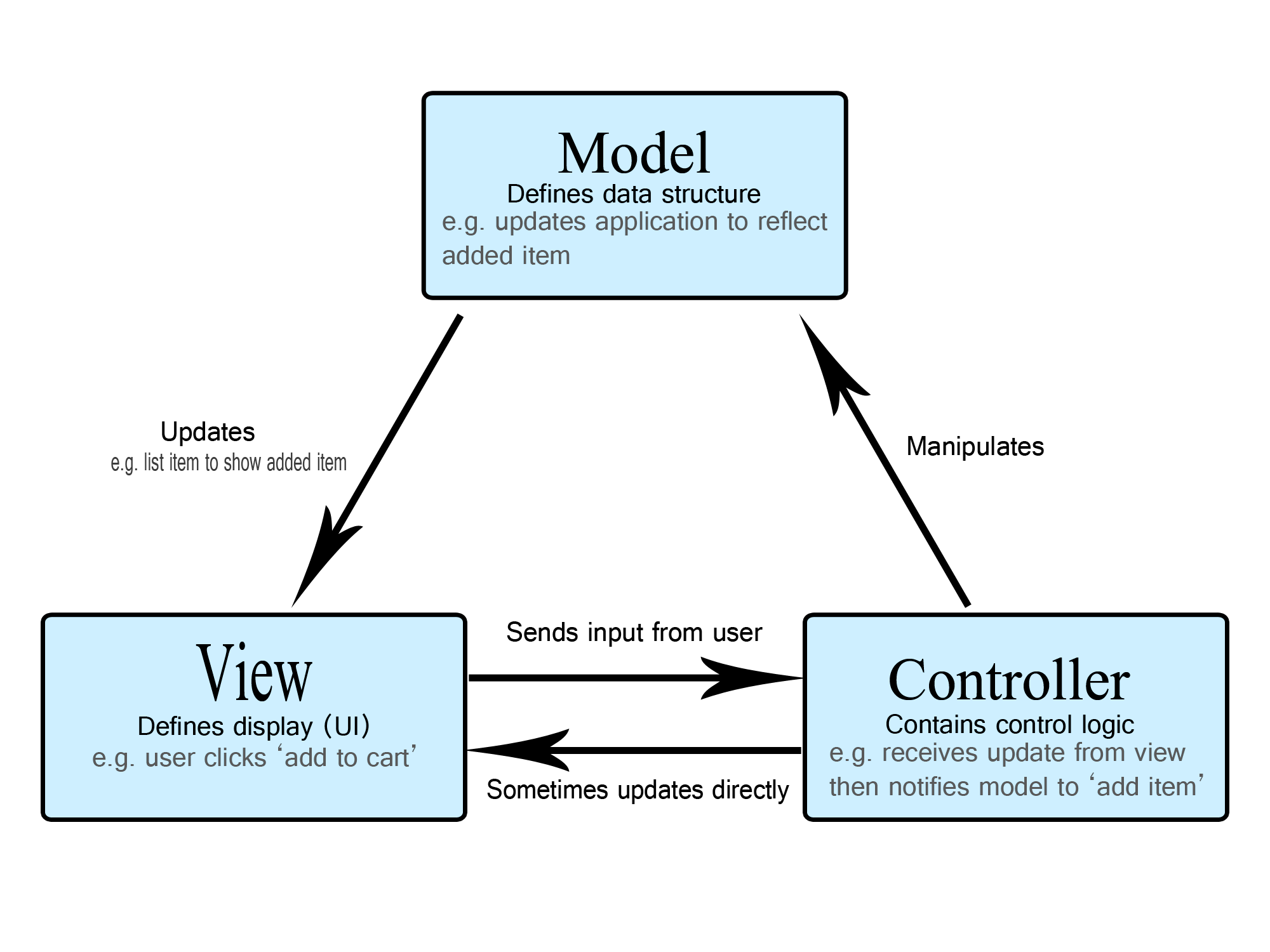
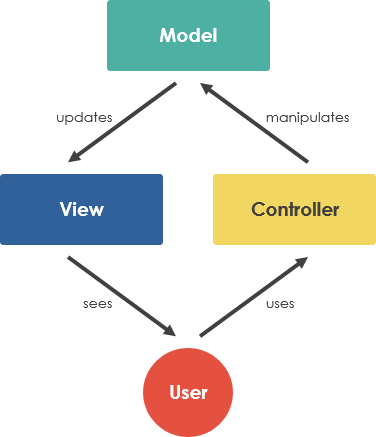
What this means is:
-
Lorekeeper has 3 layers (simplified)
-
The view: what the user sees
-
The controller: the “middleman” between the backend (Model) and the view.
-
The model: the abstraction layer of the database
- What does abstraction mean in this context?: In computer science / programming (and probably other sectors), abstraction means a layer that obscures the “hard stuff” from you. To help you understand, I’ll describe one of the models in Lorekeeper.
-
MVC is an architectural pattern, while Object-Oriented Programming (OOP) is a way of organising code using classes and objects (a paradigm). They’re different ideas, but Laravel uses both.
There is too much to cover regarding OOP in this worksheet. I recommend reading the below and asking me or others questions to strengthen your knowledge.
TLDR: class = blueprint, object = something built with that blueprint
https://github.com/lk-arpg/lorekeeper/blob/unstable/app/Models/Item/Item.php
The above link is the Item model. It is very complex and one of Lorekeepers heaviest models, alongside the User model and Character model. These are Object Oriented implementations.
Let’s explain each part:
<?php // defines that this is a PHP file

namespace App\Models\Item; // gives this class a namespace; PHP autoloading conventions usually map namespaces to folders

/**
 * This is a doc block
 * The use statements import class names so we can refer to them by their short names. They don't directly include files, autoloading handles loading classes.
 */
use App\Models\Model;
use App\Models\Prompt\Prompt;
use App\Models\Rarity;
use App\Models\Shop\Shop;
use App\Models\Shop\ShopStock;
use App\Models\User\User;

// Item inherits functionality from Model using the 'extends' keyword. This is called inheritance.
class Item extends Model {
Let’s explain line by line, I’ve added in-line comments also (this is the “//” stuff)
Comments are notes for humans reading the code. PHP ignores them when executing the program.
-
Inline: on the same line as the code
-
Doc / Block comments: around the code (the “/**”)
You’ll mostly never make these when you first start but you’ll edit them a lot.
Models are the layer that lets PHP / your Lorekeeper app interact with your database, which, as in the name, is where your data lives.
Now, why do we need a Model? Mostly for convenience! It lets us do things like have reusable functions or to edit data in a safe way, which is important for Lorekeeper since it can have many users doing things all at once.
Now I’m going to skip some lines but I’ll mention the important stuff:
    /**
     * The attributes that are mass assignable.
     *
     * @var array
     */
    protected $fillable = [
        'item_category_id', 'name', 'has_image', 'description', 'parsed_description', 'allow_transfer',
        'data', 'reference_url', 'artist_alias', 'artist_url', 'artist_id', 'is_released', 'hash', 'is_deletable',
    ];
Protected means the property can be accessed by methods inside this class and by classes that inherit from it.
Let’s expand:
-
Public: anything can access this.
-
Protected: code inside this class and its subclasses can access it.
-
Private: only code defined inside the declaring class can access it.
fillable can be assigned this way by default. Other attributes can still be changed individually through the model. This helps protect against accidentally allowing users to change fields they shouldn’t have access to.
    /**
     * The table associated with the model.
     *
     * @var string
     */
    protected $table = 'items';
This tells the model what database table it should interact with when doing work.
Now finally we’ll do some of our own work:
Task #1: Your First Function
Now that we’ve covered the basics, let’s put them into practice. We’re going to make a small, reversible change to the Item model on your LOCAL installation. Don’t make these changes on a live website… pls
Step 1: Find the Item model
Open app/Models/Item/Item.php in your code editor. Before changing anything, answer these questions:
-
What class does Item inherit from?
-
Which database table does it use?
-
What do you think $this refers to inside an Item method?
Step 2: Add a method
Inside the Item class (but outside its existing methods), add:
public function getGreeting()
{
    return "Hello! My name is " . $this->name;
}
A method is a function belonging to a class. Here, public lets other code call it, return sends back a value. $this refers to the current item object, ->name reads its name, and the dot (.) joins strings together.
Step 3: Test it
Save the file, open a terminal in your Lorekeeper project and run:
php artisan tinkerThen enter these lines, one at a time:
$item = new \App\Models\Item\Item();
$item->name = 'Test Item';
$item->getGreeting();
You should see something like “Hello! My name is Example Item”. If $item is null, your local database doesn’t contain any items yet. Create a test item first and try again. Type exit to leave Tinker (or press ctrl + c).
Checkpoint
What is the difference between a class and an object? What does return do? What happens if you try to call a method that doesn’t exist?
If something goes wrong, read the error message carefully. You can undo the changes or use version control to restore the file. Figuring out what an error is telling you is part of learning to program!